Use Pubeasy or Pubnet with a Penguin Random House Prepay Account in North America
Penguin Random House (PRH) is one of the two suppliers in the North American region who will currently link a prepay account for use with Pubeasy or Pubnet.
As a user with a PRH prepay account, you will follow the normal ordering workflow to link your PRH account and build and place your orders. However, you must make sure you have a valid credit card on file with Penguin Random House before placing your first electronic order via Pubeasy or Pubnet.
Once you submit an electronic order to PRH, they will email you a sales order confirmation that may seem distressing because it will show your entire order as "Out of Stock B/O".
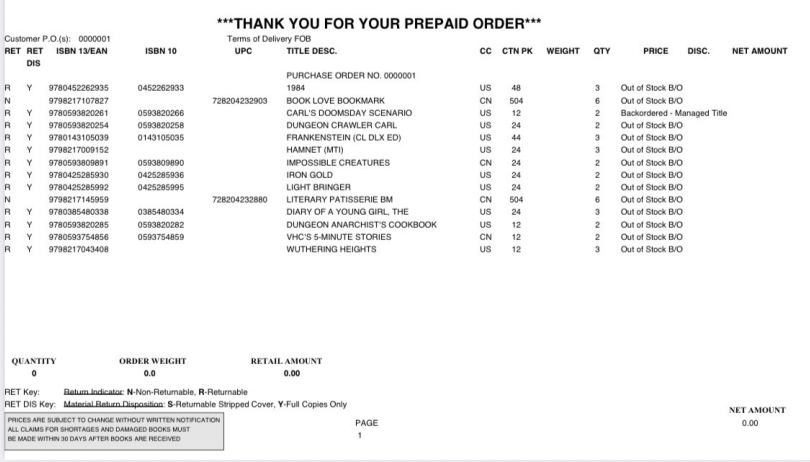
However, this is just a quirk of their prepay system. Once payment is processed, your order will ship and order status will update at Pubeasy.com and on their business site.
If you accidentally place an electronic order before you have a card on file at Penguin Random House, you will need to call Customer Service and have them manually charge your card for the order. At this time, you can also ask them to transfer you to their Billing department to hardcode the card to your account.
When will my order ship?
In order for your Pubeasy or Pubnet Penguin Random House order to ship, two things must be true:
1) You must have a card on file with Penguin Random House.
2) The charge must process successfully.
Converting to Terms
If the above workflow does not work well for you, an alternative is to fill in a credit application to convert your Penguin Random House prepay account to a terms account. Once converted, your orders will ship without prepayment so long as your account is in good standing. We suggest having 6 months of prepay history with PRH and 1-2 other terms accounts before asking the credit rep contact listed on your self-service page if you can be converted to terms.